Apple's first touchscreen MacBook Pro: what changes for Mac apps
On Friday 6 November 2026 Apple released the first Macs you can touch: a 14-inch and a 16-inch MacBook Pro with OLED touchscreens, from $2,899 and $3,399 in the US. For twenty years the answer to "will the Mac get a touchscreen?" was no. Now that it is yes, every Mac app has a new kind of user, and we build Mac apps, so this concerns us directly.
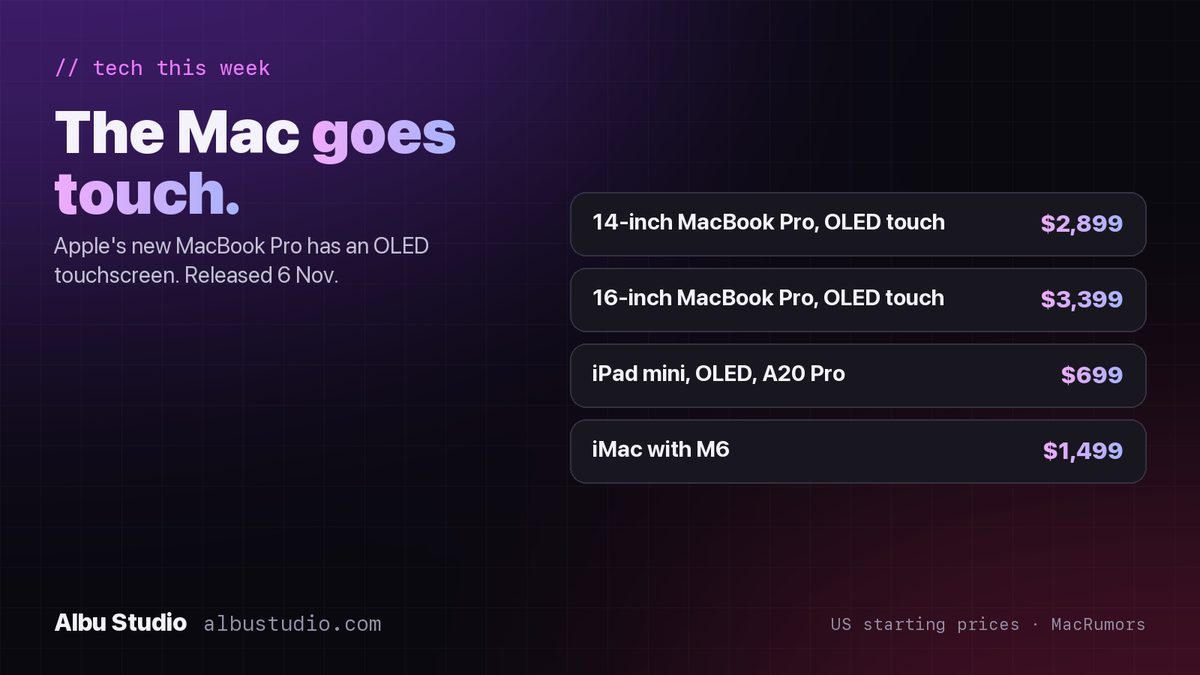
What Apple released on 6 November
- 14-inch MacBook Pro with an OLED touchscreen, from $2,899.
- 16-inch MacBook Pro with an OLED touchscreen, from $3,399.
- 14-inch MacBook Pro with the M6 chip and the classic non-touch display, from $1,999.
- iPad mini with an OLED display and the A20 Pro chip, from $699.
- iMac with the M6 chip, from $1,499.
All prices are the US starting prices reported by MacRumors on 5 November. European prices are higher once VAT is included, and Apple's own store is the place to check them for your country.
Why touch on a Mac is different from touch on an iPad
An iPad app has only ever known fingers. A Mac app has only ever known a pointer the size of a pixel, and most Mac interfaces were drawn for it: small controls, dense toolbars, menus that open on hover, and text you select by dragging a precise cursor. None of that breaks on the new MacBook Pro, because the trackpad and keyboard are still there. But the moment a person reaches up and taps the screen, your app is being used in a way nobody tested.
The good news is that the rules are already written. iPad apps have followed them for fifteen years, and the same rules now apply to a Mac app that wants to feel right under a finger.
Six things we are checking in our own Mac apps
We ship three Mac apps, Free My Disk, Sensor Doctor and Restore My USB, and this is the checklist we are going through for each of them this month.
- Tap targets. A fingertip covers about 44 points. Any button, checkbox or close icon smaller than that will be missed, and a list row with a tiny delete icon at its end is the classic failure. Make the whole row tappable, or make the icon bigger.
- Hover-only controls. Anything that appears only when the pointer is over it does not exist for a finger, because a finger does not hover. Toolbars that reveal buttons on mouse-over, tooltips that explain an icon, and rows that show actions on hover all need a second way in.
- Right-click menus. There is no right button on a finger. Every action that lives only in a context menu needs a visible button or a long-press alternative.
- Drag and drop. Dragging with a finger works, but the start of the drag competes with scrolling. Lists that both scroll and allow reordering need a clear handle.
- Text selection and small text. Selecting a word with a finger is harder than with a cursor. Dense tables with 11-point text are readable with a pointer and frustrating with a finger. Our default is 13 points, and rows at least 32 points tall.
- Scrolling and momentum. Finger scrolling should feel like iPad scrolling. Custom scroll views and tables with their own scrolling logic are where this usually goes wrong.
If you have an iPad, the fastest way to see how your Mac app feels under a finger is to run it with Sidecar on the iPad and try to use it without the pointer. Everything that annoys you there will annoy a touchscreen MacBook owner.
What we would not do
We would not redesign a Mac app into an iPad app. The majority of Mac users still have a trackpad under their hands, and the new models sell alongside a non-touch MacBook Pro that costs $900 less. A Mac app should remain a Mac app, with menus, keyboard shortcuts and dense information where it helps. Touch is an addition, and the goal is simply that nothing breaks and nothing is unreachable when someone taps.
What it means if you are commissioning a Mac app
Not much changes in price or timeline. Touch-friendly controls are a design decision made at the start, not extra work added at the end, and every Mac app we quote from now on includes it. If you already have a Mac app and want to know how it holds up, the checklist above takes an afternoon, and we can run it for you.